
AI-Assisted Video Workflow & Creative Operations

My video production work includes much more than editing footage or creating motion graphics. Each project also involves intake, planning, scripting, design, review, compliance, publishing, file management, and long-term maintenance.

As the number and variety of video projects at American Public Life grew, so did the need for a clearer way to manage that work. The projects were moving forward, but the larger workflow was difficult to see. Requests came through several channels, feedback could be scattered, approval requirements varied, and much of the process lived in my head.

I used AI as a structured thinking partner to help map that knowledge, question the gaps, and translate the existing process into a connected Monday.com workflow.

Turning an invisible video process into a visible, practical system

Monday.com was already available as a project-management tool, but we had not had the time to fully learn the platform or build a process tailored to video production.

The challenge was not simply learning how to use the software. The larger challenge was defining what the system needed to represent: how requests arrive, what information is needed, how projects move, where approvals happen, how final videos are published, and what needs to be tracked after a project is complete.

Rather than starting with a generic project-management template, I started with the real work. I used AI to guide a structured discovery process, identify relationships and missing decisions, and translate production knowledge into possible boards, groups, columns, statuses, checklists, views, and automations.

The goal was not to replace the way the team worked. It was to make the work already happening more visible, organized, and usable.

The resulting system connects three parts of the video lifecycle:

Request Intake → Video Production → Video Library

Together, these areas create a clearer path from the first request through planning, production, review, publishing, and long-term asset management.

Project Snapshot

Company: APL, American Public Life

Project Type: AI-assisted process mapping, video workflow development, creative operations, project management, production tracking, and digital asset organization

Audience: Video producers, creative team members, marketing leadership, internal requestors, reviewers, compliance partners, and business stakeholders

Stakeholders: Digital Marketing, Marketing Leadership, Creative Team Members, Product Marketing, Compliance, Sales, Training, and Internal Business Partners

Tools & Platforms: Monday.com, Microsoft Teams, Outlook, Wistia, Adobe Creative Cloud, shared server storage, online review tools, and internal AI tools

Skills Demonstrated: AI-assisted workflow design, video production operations, process mapping, communication design, project management, compliance coordination, creative problem-solving, system development, automation planning, and cross-functional collaboration


The Context

Video projects rarely move in a straight line.

A request may begin in an email, a Teams message, a meeting, or a conversation. Some projects need a script before design begins. Others start with an approved presentation, existing footage, a product document, or a simple request that still needs to be defined.

Depending on the project, the work may include:

  • Clarifying the purpose and audience
  • Gathering source materials
  • Writing or reviewing a script
  • Creating a storyboard or visual direction
  • Recording or collecting footage
  • Editing video and audio
  • Designing motion graphics
  • Adding captions
  • Coordinating internal reviews
  • Completing compliance review
  • Confirming form numbers, copyright information, and required language
  • Uploading the finished video
  • Publishing it across one or more channels
  • Tracking the final link, review date, expiration date, or archive status

The process worked because I understood how the pieces fit together, but that knowledge was not always visible to everyone else.

That created a common creative-operations problem: the work was happening, but the process itself had not been fully built.


The Challenge

The challenge was not simply learning how to use Monday.com.

A standard video-production template would not account for APL’s actual review process, compliance requirements, publishing steps, project types, or internal communication needs. Building the wrong system could create more work, require the team to change established habits, or become another tool that looked organized but was not practical enough to use.

The workflow needed to solve several connected problems.

Requests arrived through multiple channels.

Projects could begin through email, Teams, meetings, verbal requests, shared files, or existing content that needed to be updated. Important information was not always captured in the same place or in the same format.

Projects had different production paths.

A product-education video, internal culture piece, speaker introduction, social video, tribute video, and software tutorial do not follow exactly the same process. The system needed enough structure to create consistency without pretending every project was identical.

Reviews and approvals varied.

Some videos required several stakeholders, product review, compliance approval, caption checks, form numbers, or additional documentation. Others followed a much simpler review path.

Status was not always easy to communicate.

When project information is spread across email, Teams, personal notes, review links, and files, answering a simple question such as “Where does this project stand?” can require checking several places.

Publishing was not the true end of the project.

A finished video may need to be uploaded to Wistia, placed in a shared external folder, added to a website or portal, published on YouTube, used in training, or retained for future updates. Final links, approval records, captions, expiration dates, and archive decisions also needed a home.

The workflow had to connect all of those pieces while remaining practical for the people actually doing the work.


The Solution

I began designing a connected Monday.com system specifically for video projects.

The workflow includes three primary components:

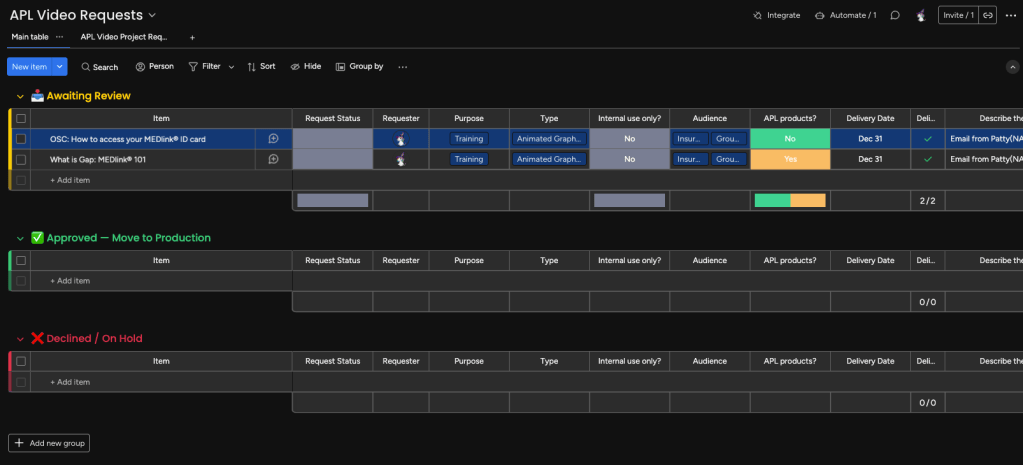
  1. A request intake process
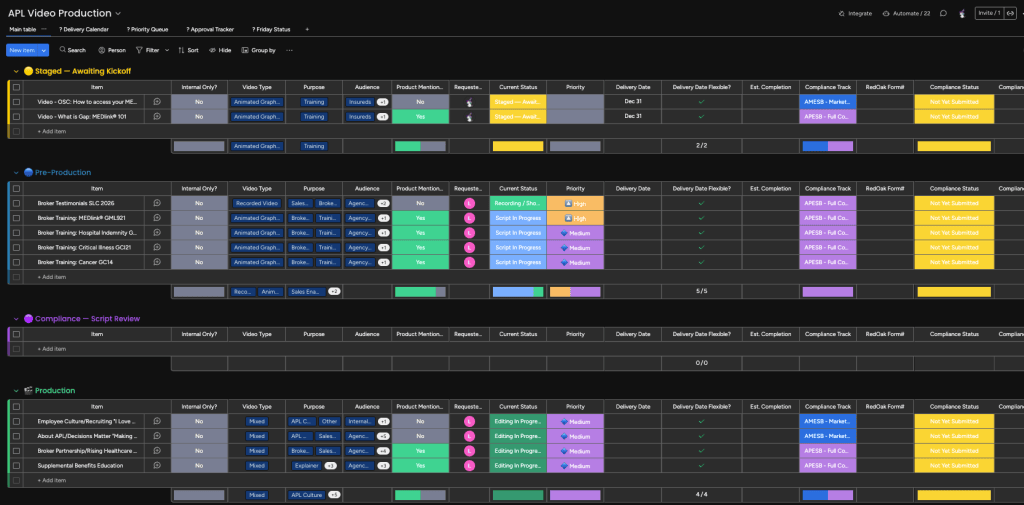
  2. A production management board
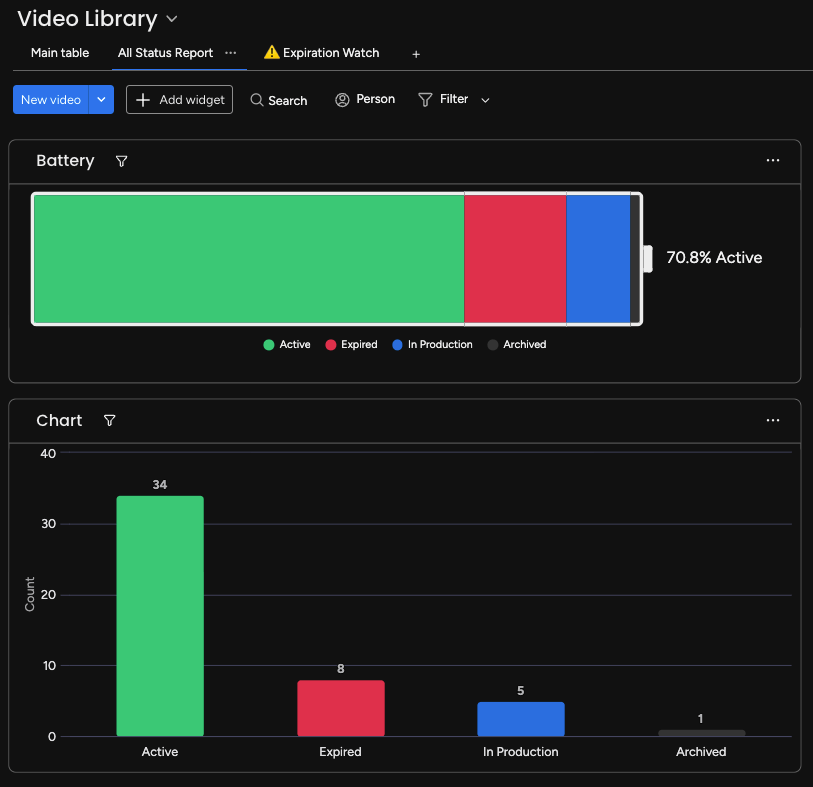
  3. A searchable video library

The intake process captures the information needed to understand and evaluate a request.

The production board manages active work, including priority, ownership, project stage, review status, blockers, deadlines, files, and next steps.

The video library creates a long-term record of finished assets, including final Wistia links, publishing locations, review requirements, expiration information, and whether a video is active, under review, expired, or archived.

This creates a more complete lifecycle than a traditional task list. It connects the request, the work, the finished product, and the future maintenance of that product.


How I Used AI

AI’s role in the project was not to produce a generic workflow and hand it to me.

I used it to help build the map.

I started by defining the goal: create a Monday.com workflow specifically for APL video projects, based on the process we already used.

From there, I used AI to guide a structured discovery process. It asked questions about:

  • The kinds of videos we produce
  • How requests currently arrive
  • What information is needed before work begins
  • How priority is determined
  • Who owns each stage
  • How scripts, design, footage, and source materials are managed
  • Which reviews and approvals may be required
  • How compliance fits into the workflow
  • Where files and versions are stored
  • How feedback is collected
  • What defines a finished project
  • Where final videos are published
  • What should be tracked in the long-term library
  • Which updates could be automated
  • What information leadership and stakeholders need to see

Many of the answers already existed in my experience, but they had never been collected in one structured place.

AI helped me identify relationships, inconsistencies, exceptions, and missing decisions. It also helped translate those answers into possible Monday.com groups, columns, status labels, connected boards, forms, checklists, views, and automations.

I evaluated each recommendation against the real production environment. Some ideas were useful immediately. Others were simplified, revised, or removed because they did not match the way our team works.

The process combined AI’s ability to organize and question information with my knowledge of video production, APL’s internal processes, stakeholder needs, and the practical realities of implementation.

AI did not supply the expertise behind the workflow. It helped me examine and structure the expertise I already had.


My Role

My role combined video-production knowledge, creative operations, process design, communication, and technical problem-solving.

I served as both the subject-matter expert and the workflow designer.

Because I manage and support video projects across their full lifecycle, I could identify what the system needed to capture—not only during editing, but before production begins and after a video is published.

A key requirement was making the system useful without forcing leadership or internal partners to live inside the platform. The workflow had to improve visibility while fitting around the communication channels people already use.

My responsibilities included:

  • Documenting the current video-production process
  • Identifying gaps and recurring communication problems
  • Defining the information needed during project intake
  • Mapping common and project-specific production stages
  • Identifying stakeholder and compliance review requirements
  • Developing the structure for connected Monday.com boards
  • Translating production knowledge into statuses, columns, checklists, and automations
  • Defining what constitutes a completed video project
  • Connecting completed projects to the long-term video library
  • Planning views that make information easier for different users to understand
  • Testing the proposed structure against real project examples
  • Working with colleagues to review and refine the workflow
  • Considering adoption without requiring every stakeholder to become an active Monday.com user

What I Designed

Request Intake

The intake process is designed to create a more consistent starting point.

Instead of beginning with an incomplete message and tracking down the remaining information later, the request structure can capture items such as:

  • Requestor
  • Business area
  • Project name
  • Video type
  • Purpose
  • Audience
  • Desired completion date
  • Distribution channel
  • Source materials
  • Script needs
  • Recording needs
  • Compliance requirements
  • Known stakeholders
  • Supporting files and links

Not every request will begin with every answer, but the intake process makes missing information visible.

It also creates a formal starting point for projects that might otherwise remain inside an email thread or conversation.

Video Production Board

The production board creates one place to view active and upcoming work.

The structure uses a Scrum-inspired flow to help separate work that has been requested from work that is actively moving through production.

Projects can move through areas such as:

  • Backlog
  • Priority Queue
  • Planning
  • Script or Content Development
  • Design and Production
  • Internal Review
  • Compliance Review
  • Final Production
  • Publishing
  • Complete

The exact path can vary depending on the project.

Each project record can also hold the information needed to understand its current state: owner, priority, target date, files, links, dependencies, stakeholders, review status, blockers, and next action.

This makes it easier to see not only what is being worked on, but what is preventing a project from moving forward.

Definition of Done

One of the most important parts of the workflow was defining what “complete” actually means.

A video is not necessarily complete when the edit is approved.

Depending on the project, completion may also require:

  • Final compliance confirmation
  • Closed captions
  • Copyright and form-number checks
  • Final Wistia upload
  • Correct folder placement
  • Publishing to the intended destination
  • A working final link
  • Completion of the publishing checklist
  • Addition to the video library
  • Documentation of review or expiration requirements

Creating a clear definition of done helps prevent the final administrative steps from becoming disconnected from the creative work.

Video Library

The video library extends the workflow beyond active production.

It creates a searchable record of completed videos and can include:

  • Video title
  • Category or product
  • Intended audience
  • Final Wistia link
  • Publishing destination
  • Completion date
  • Form number
  • Review date
  • Expiration date
  • Owner
  • Caption status
  • Current status
  • Related files or project record

Library statuses can identify whether a video is:

  • Active
  • Under Review
  • Expired
  • Archived

This creates a stronger connection between creative production and content governance.

Instead of treating the final video as a file that disappears into a folder, the library helps preserve the information needed to find, use, review, update, or retire it later.

Views and Automations

The workflow also creates opportunities for different views based on what each person needs to know.

A video producer may need detailed production steps. Leadership may only need priority, status, deadline, and blockers. A stakeholder may need a review notification without needing access to the entire board.

Potential automations can support actions such as:

  • Creating a production item from an approved request
  • Notifying an owner when a project moves into a new stage
  • Alerting stakeholders when a review is ready
  • Flagging projects approaching a target date
  • Creating a library record when a project is completed
  • Identifying videos approaching a review or expiration date
  • Reducing repetitive status-update messages

The goal is not to automate every interaction. It is to automate predictable handoffs and reminders while keeping creative and compliance decisions with the appropriate people.


Process and Approach

1. Start with the work, not the software

I did not begin by selecting a Monday.com template.

I began by documenting how video projects actually move through APL: where they come from, what needs to happen, who becomes involved, where delays occur, and what information needs to survive after publishing.

This kept the platform from defining the process before the process itself was understood.

2. Use AI to ask better questions

The value of AI was not that it immediately knew the answer.

Its value was in helping me question the workflow from several angles and identify details that could easily be overlooked when a familiar process has become automatic.

The questions helped turn experience and instinct into something that could be documented and evaluated.

3. Protect what already works

The project was not intended to replace every existing communication habit.

Stakeholders could continue using familiar tools for conversations and feedback when appropriate. Monday.com would become the central record of the project rather than the only place communication was allowed to happen.

This distinction was important for creating a system people could realistically adopt.

4. Connect the entire lifecycle

The project needed to cover more than active production.

Connecting intake, production, publishing, and the video library prevents important information from being lost as the project moves from one phase to another.

5. Test the structure against real projects

I evaluated the workflow using actual categories of work, including product education, internal communications, speaker introductions, social content, software tutorials, event videos, and other recurring or one-time projects.

Testing with different project types helped reveal where flexibility was needed and where a common structure could still be maintained.

6. Build for visibility, not additional reporting

A useful project-management system should reduce the need to recreate information for every update.

By keeping status, priority, deadlines, review stages, links, and blockers connected to the project, the workflow can support status reporting as a natural output of the work rather than a separate administrative exercise.

7. Treat the workflow as something that will evolve

The first version does not need to predict every possible project.

The system is being built to support testing, feedback, and refinement. New fields or automations can be added when a real need appears rather than building unnecessary complexity in advance.


Outcome and Impact

The workflow is still being implemented and refined, so I am not presenting it as a finished transformation with final performance metrics.

However, the project has already created meaningful progress.

A process that was previously spread across experience, memory, email, Teams, review links, Wistia, and shared files is becoming a connected and visible system.

The work has:

  • Created a clearer picture of the full video lifecycle
  • Connected project intake with production and long-term asset management
  • Identified information that was previously captured inconsistently
  • Made review, compliance, publishing, and library requirements part of the same process
  • Established a clearer definition of when a video project is truly complete
  • Reduced the mental burden of holding the entire workflow in my head
  • Created a stronger foundation for status reporting, handoffs, prioritization, and future automation
  • Provided a practical way to test Monday.com without forcing the team to replace every existing process

The project also changed how I think about AI-assisted work.

AI is often presented as a way to generate a faster answer or complete a task with fewer steps. In this project, its more useful role was helping me slow down, examine a complicated process, and make my own knowledge more visible.

It helped me move from “I understand how this works” to “I can show how this works.”

That is an important distinction.

The final value of the workflow will not come from AI or Monday.com alone. It will come from combining the right technology with practical experience, clear communication, thoughtful implementation, and a system people can actually use.

More from The Captain’s Chair